

You just launched a brand-new business website. The design looks sharp, the content is ready, and you’re excited to start getting customers online. But when you search your business name on Google… nothing. Your site is nowhere to be found.
If this sounds familiar, you’re not alone. Thousands of business owners face the same frustrating situation every year. The good news? In most cases, this is completely fixable once you understand what’s actually going wrong.
In this guide, we’ll break down exactly why your website isn’t showing up on Google search, walk through the most common google index issues, and give you a practical new website SEO checklist you can use to get your site ranking properly.
Understanding How Google Actually Finds Your Website
Before diagnosing the problem, it helps to understand the basics. Google uses automated bots — commonly called the google crawler — to browse the internet and discover new pages. This process is known as google crawl. Once a page is crawled, Google decides whether to add it to its massive database, called the index. Only pages that are indexed can appear in search results.
So when people ask “why is my website not ranking,” the real question usually breaks down into two separate issues:
- Indexing problems — Google hasn’t added your site to its database at all.
- Ranking problems — your site is indexed, but it’s buried on page 5, 10, or further, where nobody scrolls.
Let’s look at both, starting with the more urgent one.
Common Reasons a New Website Isn’t Showing Up on Google
1. Your Website Is Brand New
If you’re wondering why your new website is not showing up on Google, patience is often part of the answer. Google doesn’t index new sites instantly. It can take anywhere from a few days to several weeks for crawlers to discover your domain, especially if no other websites are linking to it yet.
2. Robots.txt Is Blocking Google
One of the most common — and most overlooked — reasons for website indexing failures is a misconfigured robots.txt file. This small file tells search engines which pages they’re allowed to crawl. Many website builders accidentally leave a “Disallow: /” rule active, which tells Google to stay away from your entire site.
Running your site through a robots.txt tester takes less than a minute and can instantly reveal whether this is the culprit.
3. Missing or Incorrect XML Sitemap
An XML sitemap acts like a roadmap, helping Google understand your site’s structure and find all your important pages quickly. Without one — or with a sitemap that hasn’t been submitted through Google Search Console — your pages may sit undiscovered for far longer than necessary.
4. “Noindex” Tags Left in Place
Developers often add a “noindex” meta tag during the website-building phase to keep unfinished pages out of search results. If this tag isn’t removed before launch, it tells Google directly: “please don’t index this page.” This is an incredibly common cause behind sites that are live but invisible.
5. Poor Website Design and SEO Foundations
There’s a strong relationship between website design and SEO. Slow-loading pages, non-mobile-friendly layouts, broken internal links, and confusing site structures all make it harder for Google to crawl and rank your content effectively. A visually appealing website that ignores SEO fundamentals will almost always underperform.
6. Technical SEO Issues
Beyond the basics, deeper technical SEO issues can quietly sabotage your visibility:
- Duplicate content across pages
- Missing or duplicate title tags and meta descriptions
- Broken redirects or redirect loops
- Poor URL structure
- Missing structured data (schema markup)
- Slow Core Web Vitals scores
A proper technical SEO audit identifies these hidden problems, many of which aren’t visible just by looking at the site.
7. Google Penalty
In some cases, a website was indexed and ranking well — until it suddenly disappeared. This often points toward a manual action or algorithmic penalty, usually triggered by black-hat SEO tactics like keyword stuffing, spammy backlinks, or duplicate content scraped from other sites. If this applies to you, Google penalty removal typically involves identifying the violation through Search Console, correcting it, and submitting a reconsideration request.
8. Lack of Backlinks and Authority
Google tends to trust websites that other reputable sites link to. A brand-new domain with zero backlinks has to work harder to prove its credibility, which can slow down both indexing and ranking, particularly for competitive keywords tied to website ranking on Google search.
How to Get Your Website Indexed on Google
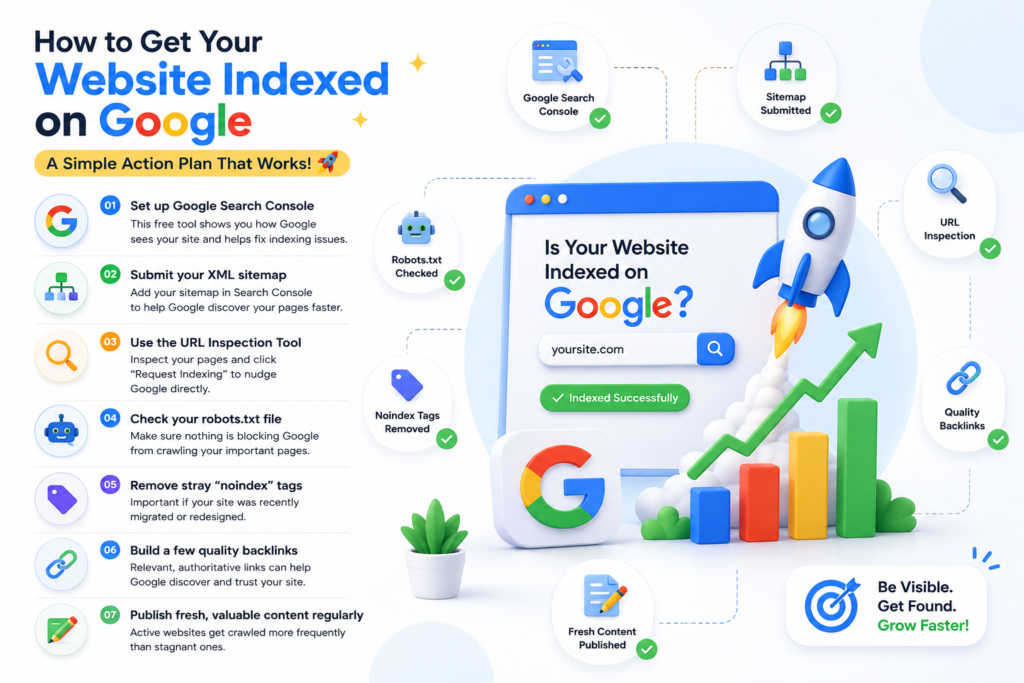
If your goal right now is simply how to get your website indexed on Google, here’s a straightforward action plan:
- Set up Google Search Console — This free tool is non-negotiable. It shows you exactly how Google sees your site, flags indexing errors, and lets you request indexing manually.
- Submit your XML sitemap — Found under “Sitemaps” in Search Console, this speeds up discovery significantly.
- Use the URL Inspection Tool — Paste in your homepage and key pages, then click “Request Indexing” to nudge Google directly.
- Check your robots.txt file — Confirm nothing is blocking crawlers from accessing your important pages.
- Remove stray “noindex” tags — Especially important if your site was recently migrated or redesigned.
- Build a few quality backlinks — Even a handful of relevant, authoritative links can accelerate the process.
- Publish fresh, valuable content regularly — Active websites get crawled more frequently than stagnant ones.
A Quick New Website SEO Checklist
- If you’re launching a site soon, or troubleshooting one that just went live, run through this new website SEO checklist:
- Core content targeting relevant, realistic keywords
- Robots.txt allows crawling of important pages
- XML sitemap created and submitted to Search Console
- No accidental “noindex” tags on live pages
- Mobile-friendly, fast-loading design
- Unique title tags and meta descriptions on every page
- Clear internal linking structure
- SSL certificate installed (HTTPS, not HTTP)
- Google Business Profile set up (for local visibility)
- At least a few high-quality backlinks in progress
When to Consider Professional Help
Some indexing and ranking issues are simple fixes you can handle yourself in an afternoon. Others — particularly penalty recovery, complex technical audits, or long-term visibility strategy — benefit from experienced hands.
This is where working with a website SEO consultant or a team offering dedicated technical SEO services can make a real difference. A professional audit typically uncovers issues business owners miss entirely: crawl budget waste, structured data errors, duplicate content across staging and live environments, and more.
If your goal is strong, sustainable website ranking in Google search results, particularly within competitive markets like US-based Google search results, combining solid technical SEO with consistent content and authority-building is usually the fastest path forward.
Final Thoughts
Discovering that your website isn’t showing up on Google can feel discouraging, especially after investing time and money into building it. But in the vast majority of cases, the cause is identifiable and fixable — whether it’s a blocked robots.txt file, a missing sitemap, lingering noindex tags, or deeper technical SEO issues holding your pages back.
Start with the basics: confirm Google can actually crawl and index your site, then focus on strengthening your technical foundation and building authority over time. Whether you handle this yourself using free tools like Search Console, or bring in a specialist for a full website audit, the key is consistency. SEO isn’t a one-time fix — it’s an ongoing process that rewards patience, clean technical execution, and genuinely useful content.
Get the fundamentals right, and your website won’t just show up on Google — it will start earning the visibility your business deserves.